Bikes
Bikes Vans
Vans Motorhomes
Use our free V5C check to enter a vehicle registration number and see the latest V5 issue date in seconds. It is a quick way to see the latest V5C issue date held by DVLA, so you can tell whether the paperwork matches before you go any further.
For buyers, this simple logbook check can be an important first step. If the seller shows you a logbook that looks older, newer, or different from what you expected, that is a signal to pause and look more closely at the vehicle details and the document itself.
It is especially useful when you are viewing a used car privately and want a quick sense check before making decisions. Rather than relying on the date printed on the paper logbook alone, you can compare it with the latest V5C issue date on record to see whether they match.
What is the V5C Issue Date?
A V5C, also called the vehicle registration certificate, is the DVLA logbook for the vehicle. It records key details such as the make, model, colour, engine size, and vehicle identification number (VIN), along with the name and address of the registered keeper (the registered keeper is not always the legal owner). It is also important to remember that a public vehicle check is not an owner lookup by registration number that reveals a private keeper’s identity.
The date of the last v5c (logbook) issued is the exact date the DVLA printed and sent out the current V5C document. In simple terms, it tells you when the logbook, now linked to the vehicle, was created, not when the car was first made, first sold, or first registered.
This is where many people get confused. The V5C issue date is different from the vehicle’s date of first registration, which shows when the car was first registered for use on the road. A car first registered in 2018 could still have a much newer last V5 issue date if the logbook was reissued later after a change of keeper, address update, or correction.
Why You Must Check the V5C Issue Date Before Buying
Before you buy, always check when v5 was issued against the paper logbook in front of you. If the printed issue date on the V5C does not match the latest date held on the official database, treat that as a serious warning sign. That can mean the logbook is no longer valid, has been replaced, or does not belong with that vehicle at all.
Checking the issue date should be one part of a full DVLA verification, especially when you are buying privately and want to confirm the paperwork matches the official vehicle record.
Avoid Car Cloning and Fraudulent Sellers
This is one of the fastest ways to spot logbook fraud before money changes hands. Criminals can use old paperwork, stolen blank documents, or a logbook from another vehicle to make a car look genuine. A quick check of v5c online helps confirm that the document shown to you is the most recently issued version, not an outdated or fake one.
Cloned vehicles are built to look legitimate at first glance, which is why paperwork checks matter just as much as the car itself. A cloned vehicle may be using copied number plates and convincing paperwork to hide its real identity.
If the V5C date does not match the official record, look into it before doing anything else. A sensible next step is to run a write-off check to see whether the vehicle has any recorded damage history that might explain the issue. Ask the seller to explain the mismatch clearly and support it with proper documents. If they become defensive, vague, or dismissive, walk away.
Verify Keeper Changes and Vehicle Updates
A recent V5C issue date is not automatically a problem. The logbook can be reissued after a change of address, a registration update, vehicle detail changes, or when the keeper's information is amended. That is why the date should start a conversation, not end one.
Ask the seller why the issue date is recent and listen for a clear, consistent answer. If they say the car has had a plate change, keeper update, or correction to the record, that explanation should make sense alongside the rest of the vehicle’s history, including its ownership change history and supporting paperwork.
What is Included in Our V5C Logbook Check?
Our tool queries official DVLA database records securely in real-time. This free logbook check gives you the key details in a clear, easy-to-read format, helping you understand the logbook record instantly without digging through paperwork.
Here is what you can see when you check the last v5 issued with My Car Reg Check:
- The latest V5C issue date, so you can see when the current logbook was issued
- The current DVLA tax status
- The current MOT status
- Number of previous keepers, where available in your selected report
Taken together, these details help you make sense of the logbook record in a practical way. If anything still feels inconsistent, a mileage check can help you see whether the vehicle’s recorded use looks consistent over time. For example, if the V5C was issued very recently and the seller says nothing has changed, that is a good reason to ask a few more questions before moving forward.
How to Run a Free V5C Issue Date Check
Running a free V5C issue date check with us is straightforward. Our online service is built to help you check v5 online in a few simple steps, so you can compare the official record with the paper logbook in front of you.
- Enter the vehicle registration into our checker above
- Wait a few seconds while we pull the latest V5C issue date for that vehicle
- Compare the date in our report with the date printed on the seller’s physical logbook
The two dates should match exactly. If they do not, do not brush it off as a small admin error. Treat it as a serious warning sign and walk away unless the seller can provide a clear, credible explanation backed up by proper documents.
This check is especially useful when you are viewing a car privately, where you may have only a few minutes to make a judgment. A quick comparison can help you spot a problem before you agree on a price, leave a deposit, or start the process to sell your car as part of the deal.
Logbook Red Flags: Practical Tips for Buyers
When you view a used car, do not treat the logbook as a formality. A few basic checks can tell you a lot about whether the paperwork looks genuine and whether the seller is being straight with you.
- Ask to see the physical V5C before you agree to anything.
- Make sure it is the current red version. If the seller shows an older blue V5C, ask why it has not been replaced and take extra care before you proceed.
- Hold it up to the light and look for the DVL watermark.
- Check that the VIN on the logbook matches the VIN stamped on the vehicle chassis.
- Be cautious if anything looks altered, damaged, or unusually poor quality. If the paperwork and the vehicle’s condition do not seem to line up, a salvage history check can help you look for signs of serious past damage.
One of the biggest warning signs is a seller trying to explain away missing paperwork. Never be rushed into buying a car without a V5C, and never hand over money because someone says the logbook is “in the post”. A genuine seller should apply for a replacement first and wait until the correct document arrives.
It is also worth watching how the seller handles basic questions. If they become vague when you ask where the VIN is, why the document looks unusual, or why they do not have the V5C with them, take a step back.
As a final tip, be cautious with logbook images sent online. A photo of the V5C can be useful, but it should never replace checking the original document in person before you buy. If a seller only wants to share photos and not show you the physical logbook, take extra care.
FAQs
What does the date of the last V5C (logbook) issued mean?
It refers to the date the current V5C logbook was issued by DVLA. It is not the vehicle’s first registration date but the most recent logbook issue after updates, replacements, or ownership changes.
Can I view my V5C logbook online?
DVLA offers online services to update or replace a V5C, but there is no full digital version of the V5C available to view online as a complete document.
Where can I find the V5C document reference number?
The V5C document reference number is an 11-digit number found on the front page of the logbook. The V5C/2 new keeper slip uses a 12-digit reference number.
What is a V5C logbook history?
A V5C logbook history is the record behind the vehicle’s registration document over time. It helps show when the logbook has been updated or reissued and can give useful context around keeper changes and other record updates. For buyers and car owners, it is a helpful way to understand whether the paperwork looks consistent with the vehicle’s background.
Does a V5C prove legal ownership of a vehicle?
No, a V5C shows the registered keeper, not legal ownership. The legal owner may be a finance company until any outstanding agreement is fully settled.
What should I do if the seller lost the V5C?
Ask the seller to sort it out before the sale goes any further. A genuine seller should apply for a replacement logbook rather than ask you to rely on verbal promises or incomplete paperwork. If they try to rush the deal, avoid clear questions, or want payment before the new document arrives, treat that as a warning sign and proceed very carefully.
How long does a replacement V5C take from the DVLA?
If you are replacing a lost or damaged V5C online or by phone as the registered keeper, it will usually arrive by post within 5 to 7 working days.
If you cannot use the online service and need to apply by post, it usually takes around 4 weeks, although some postal applications involving other changes can take longer.
Why is the full logbook (V5C) history important?
It helps you put the current logbook into context rather than looking at one date in isolation.
According to the GOV.UK, used-car guidance, the buyers should see the V5C, check the details match DVLA information, and make sure the logbook is not for a stolen vehicle. In practice, that is why a fuller logbook history can be useful: it helps you decide whether changes look routine or whether the vehicle needs more questions and a deeper check.
Where can I find my vehicle’s full V5C logbook history?
Public DVLA vehicle information will not normally show you a full keeper-by-keeper logbook history. The information about the current or previous registered keeper has to be requested from DVLA, while public vehicle checks are mainly there to help you compare the vehicle details you have been given before you buy.
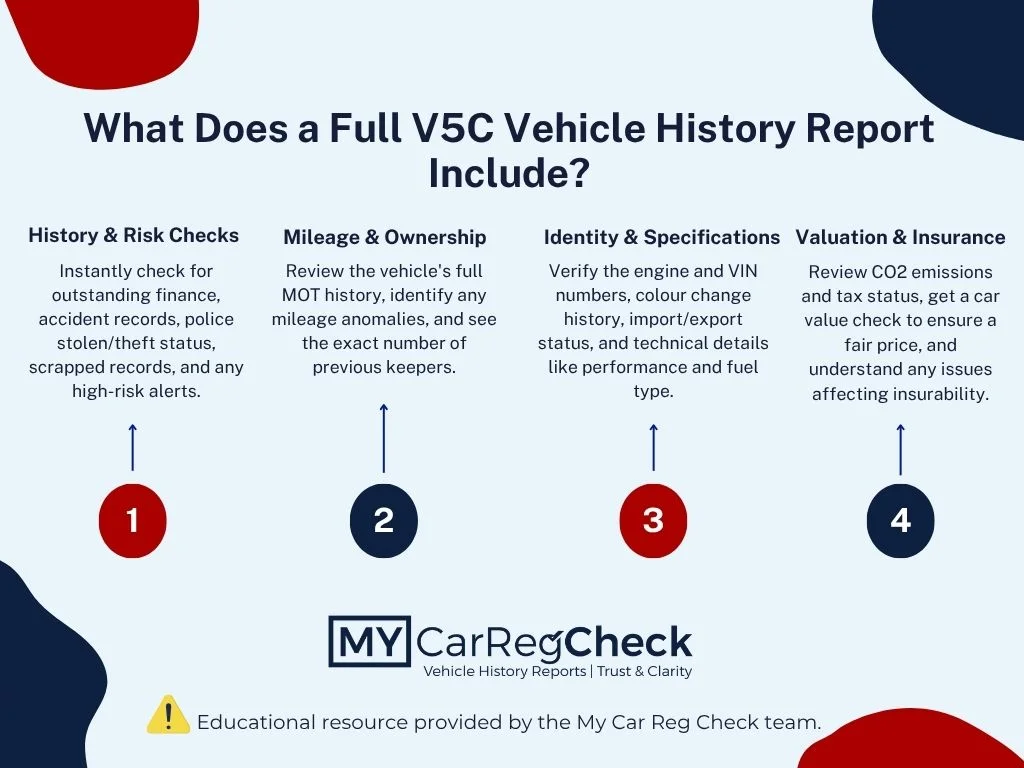
With My Car Reg Check, the simplest place to start is our free V5C issue date check. If you need a full picture of the vehicle’s background, you can then move on to a more detailed car history check to review mileage progression, previous keeper information, MOT history, and other key vehicle records.
Is a V5C logbook history check free?
A basic V5C check can be free. The DVLA’s vehicle information service allows anyone to verify details like the vehicle’s last logbook issue date using just the registration number. With My Car Reg Check, that makes a free V5C issue date check a sensible place to start, while a fuller history check is there if you want more background on the vehicle.
How accurate is the V5C logbook history information?
It is most accurate when you compare it with the V5C and the vehicle itself. As a check, it is useful, but it should always be backed up by the paperwork and the car in front of you.
Can a V5C logbook history check help when buying a used car?
Yes, it can be very helpful. The official used car buyer checklist advises verifying the physical V5C, cross-referencing details with DVLA records, reviewing MOT history, and ensuring the vehicle isn't recorded as stolen. A V5C logbook history check helps you do those early sense checks with more confidence before you agree a price or move ahead with the purchase.
What should I do if there are discrepancies in the V5C logbook history?
Stop and check the details before you go any further. It is critical to run proper used vehicle checks to confirm the logbook details match the physical vehicle, including the vehicle identification number (VIN) and engine number. If the seller cannot explain the mismatch clearly and convincingly, do not hand over any money.