Bikes
Bikes Vans
Vans Motorhomes
Use our free VIN check UK tool to confirm a vehicle’s true identity from its 17-character VIN. Enter it below, and our VIN checker will help you see whether the details line up, so you can spot warning signs early and protect yourself against car cloning.
A quick VIN number check is one of the simplest ways to check that the vehicle in front of you is the one it claims to be. Whether you are buying, selling, or checking your own car, it gives you a clear starting point to verify identity, uncover hidden history, review vehicle specification, and decide whether you need a deeper report.
How to Run a VIN Check in Three Simple Steps
Find Your VIN
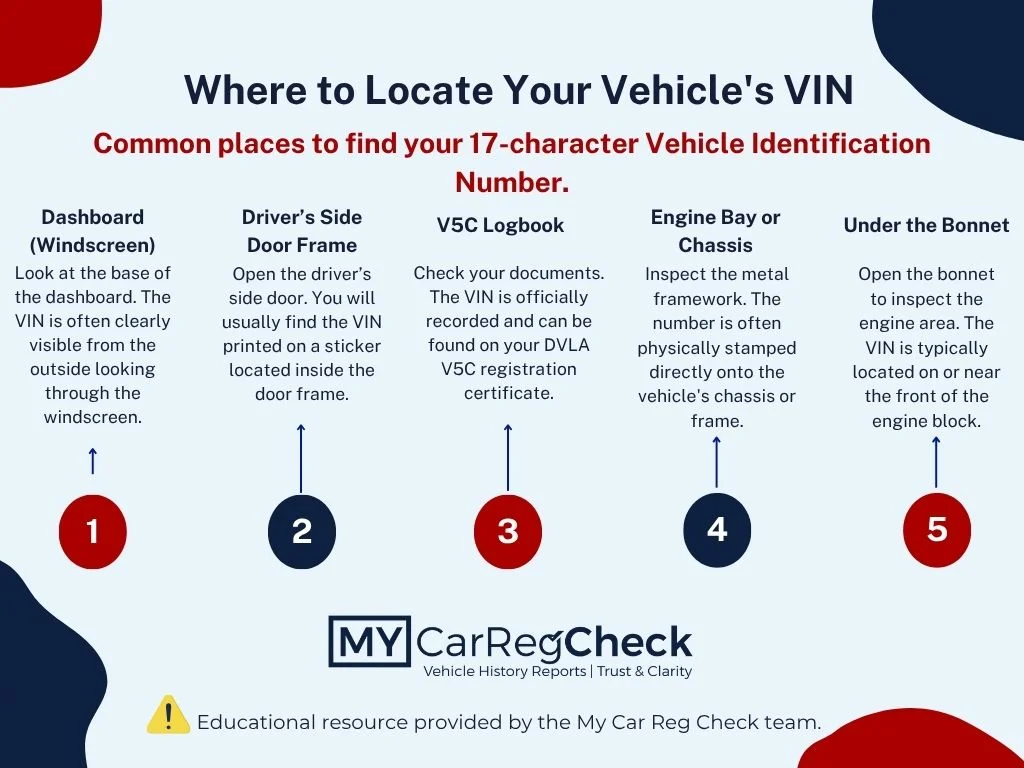
Start by locating the VIN on the vehicle itself or on its paperwork. Common places include the dashboard near the windscreen, the driver’s side door frame, the engine bay, or the V5C logbook. Take a moment to copy it exactly as shown, because one wrong character can bring up the wrong vehicle.
Enter the VIN
Type or paste the full 17-character VIN into the search box above and submit it. A careful VIN number lookup only takes a few seconds, so it is worth checking each character before you run the search.
Review Your Report
Your results will show the key details linked to that VIN, so you can quickly see whether anything needs a closer look. This is especially useful when you are comparing cars, checking a vehicle before you go to see it, or trying to spot issues that may not be obvious from the advert or the seller’s description.
What Our VIN Check Reveals About a Vehicle
- Note: Our free VIN check provides baseline vehicle identification details (such as make, model, and year). The critical history checks listed below—including finance, stolen status, and write-off data—are premium features that require upgrading to our comprehensive paid report.
A VIN can tell you far more than basic factory details. Our deeper checks bring together key vehicle data that helps you judge risk before you commit to a car.
Outstanding finance (Premium Feature)
We check whether the vehicle is linked to hire purchase, PCP, or another live finance agreement. That matters because if the loan is still attached to the car, the finance company may still have a legal interest in it.
PNC stolen status (Premium Feature)
We check against Police National Computer records to see whether the vehicle has been reported stolen. This is one of the most important checks when you want to rule out identity fraud before buying a car.
Motor Insurance Anti-Fraud and Theft Register (MIAFTR) insurance write-offs (Premium Feature)
We look for recorded insurance write-off records, including Category S, Category N, Category A, and Category B markers. This can also help you understand whether there is any salvage history that may affect how the vehicle should be assessed. A write-off does not always mean a car should be avoided, but it does mean you need to understand the damage history, repair quality, and how that affects value.
If you are weighing up whether the asking price is realistic, it also helps to compare the vehicle’s current market value before making a decision.
Mileage verification
We compare recorded mileage points to help flag a possible mileage discrepancy and build a clearer picture of the vehicle’s mileage history. If the numbers move backwards, jump oddly, or do not fit the vehicle’s age and use, that is a strong sign the car needs closer scrutiny.
Recorded MOT mileage trail
Mileage checks make more sense when viewed alongside the car’s MOT history. Looking at the mileage trail next to an MOT check can help you spot patterns that a seller’s advert will never show.
Why check the VIN of a vehicle against its vehicle registration?
Checking the VIN against the vehicle’s registration plate is one of the most important steps you can take before you hand over any money. A data report can tell you what should match, but only a physical inspection can confirm that the car in front of you is carrying the same identity.
This matters because of car cloning. Criminals can steal a vehicle, fit it with fake number plates from a similar legitimate car, and make it look genuine to an unsuspecting buyer. On paper, the car reg check may appear clean if you only search the plate, while the physical vehicle itself tells a different story.
That is why you should always compare the VIN shown on the car with the registration details returned in your report. If the VIN numbers do not line up, or if the vehicle details do not match what you are seeing in person, treat that as a serious warning sign and walk away until the mismatch is properly explained.
A VIN, or Vehicle Identification Number, is the car’s unique 17-character identity code. Think of it as the vehicle’s fingerprint: it is used to distinguish one car from another, even when two vehicles look almost identical from the outside.
A proper VIN follows an international format and never uses the letters I, O, or Q. Those letters are left out to avoid confusion with the numbers 1 and 0, which helps reduce errors when the code is read, recorded, or entered into a report.
You may hear people say chassis number when they really mean the VIN. The VIN is the full standardised code used by a VIN decoder and by vehicle history systems to identify the car correctly.
The Anatomy of a 17-Digit VIN
Each part of the VIN has a job to do, which is why it can reveal so much about the vehicle before you go any further.
Digits 1 to 3: World Manufacturer Identifier (WMI)
This section identifies the manufacturer and the country of origin. It tells you who built the vehicle and where that production line is based.
Digits 4 to 9: Vehicle Descriptor Section (VDS)
This part covers the vehicle’s key specification details, such as model, body style, engine type, and other factory-set features. In simple terms, these are the main vehicle descriptors that separate one version of a car from another.
Digits 10 to 17: Vehicle Identifier Section (VIS)
This section identifies the individual vehicle and can help confirm details such as the car's first registration date when you are checking the vehicle more closely. In the standard 17-character VIN format, digit 10 is used to indicate the model year, digit 11 shows the assembly plant, and digits 12 to 17 form the vehicle’s unique serial number.
Where can I find the VIN?
You can usually find the VIN in four main places on the vehicle and its paperwork. When you check it, take your time and compare every character carefully, especially if you are about to buy a used car.
Lower corner of the passenger-side windscreen
Look through the glass at the base of the windscreen on the passenger side. This is often the quickest place to spot the VIN from outside the car.
Driver’s side door frame
Open the driver’s door and check the door jamb or B-pillar for a sticker or metal VIN plate. This area is commonly used by manufacturers and is one of the easiest places to inspect during a viewing.
Engine bay or chassis
Open the bonnet and look for the VIN stamped into the metal in the engine bay or on the chassis. This marking should look original and consistent, not freshly altered, uneven, or tampered with.
V5C logbook
The VIN should also appear in the V5C. The important point is not just that the logbook has a VIN, but that it matches the physical car exactly, character for character. If the VIN on the paperwork does not match the vehicle exactly, it may be worth carrying out a V5C issue check before you go any further.
If one VIN location does not match another, or the paperwork differs from the vehicle itself, stop and question it before going any further. A mismatch is never something to brush off.
How do I undertake a VIN check to rule out cloning?
Use this simple checklist if you want to reduce the risk of buying a cloned vehicle:
Start with the registration.
Before you travel to see the car, run a free initial car reg check using the number plate. This gives you an early warning if the registration is linked to obvious problems and helps you decide whether the viewing is worth your time.
Go and inspect the car in person.
A report can only check the data it is given. To rule out cloning properly, you need to see the vehicle yourself and find the VIN that is physically attached to that car.
Find the VIN on the vehicle.
Check the VIN on the car, not just the paperwork or advert. If you want to check the VIN number properly, make sure you are reading it from the actual vehicle and not relying on a photo sent by the seller.
Enter the VIN into the tool.
Run the VIN through our tool and compare the result with the registration details already linked to the vehicle.
Make sure everything matches exactly.
The registration, VIN, vehicle description, and paperwork should all line up. If there is any mismatch, missing explanation, or sign that the identity has been altered, do not hand over any money until it has been resolved.
A genuine seller should have no issue with you carrying out these checks during a viewing. If they try to rush you, block access to the VIN, or dismiss a mismatch as nothing important, treat that as a reason to walk away.
Is the VIN check tool free to use?
Yes, you can use our free VIN check as an initial way to verify the vehicle from its VIN. If you want more detail after that, you can choose the level of report that suits you best.
This gives you a simple way to start with the basics first, then decide whether you need a more detailed history check or a broader DVLA check. That is especially useful if you are comparing more than one vehicle and do not want to pay for a full report on every car straight away.
FAQs about VIN
Is it safe to give a buyer my VIN?
In most genuine sales situations, yes. A serious buyer may ask for the VIN so they can run their own checks before making a wasted trip, and that is a normal part of a careful private sale.
- The VIN itself is generally fine to share. It is there to identify the vehicle, and a buyer often needs it to do proper due diligence.
- The V5C is different. Do not send photos of your V5C logbook or share the 11-digit document reference number with someone you do not know.
- That number is sensitive. In the wrong hands, it can be misused to interfere with the vehicle’s official DVLA records, including changes that you have not authorised.
A safer approach is to share the VIN during the early conversation, but keep the V5C private until you are meeting a genuine buyer in person. At that point, you can show the physical logbook so they can check the details without handing over information they do not need.
Is my VIN data secure when using this tool?
Yes. We handle the VIN you enter securely and use it only to return the relevant vehicle information linked to that code. We know trust matters when you are checking a vehicle, so we treat your data responsibly and do not use it for anything that is not needed to provide your report.
Can I check the VIN for any type of vehicle?
In most cases, a VIN check works for vehicles that use the standard 17-character VIN format. That usually includes modern cars and many other road vehicles, but some older, imported, rebuilt, or specialist vehicles may use a different format or have limited records.
If the vehicle does not use a standard VIN, the check may return incomplete results or no match at all. That does not always mean there is a problem, but it does mean the vehicle needs a little more care and verification.
How long does a VIN check take?
A VIN check usually only takes a few seconds once you enter a valid VIN. That makes it practical to use while comparing adverts, checking a vehicle before a viewing, or reviewing details on the spot.
The part that takes longer is not the search itself, but making sure you have entered the VIN correctly. A rushed entry can waste time and create confusion, so it is worth checking the characters before you submit.
What should I do if the VIN is invalid?
Start by checking the VIN carefully for typing mistakes. VINs are 17 characters long, and it is easy to misread similar-looking letters and numbers when copying them from glass, paperwork, or a metal stamp.
If the VIN still does not work, compare it wherever it appears on the vehicle and its documents. If the characters do not match, look altered, or seem incomplete, stop there and question the vehicle’s identity before you go any further.