Bikes
Bikes Vans
Vans Motorhomes
Run a free DVLA vehicle check in moments and get the key details first. Whether you are checking your own car, comparing a vehicle before viewing it, or doing a quick sense-check before buying a used car, this tool helps you understand the basics before you go any further.
By entering the registration number, you can check key DVLA vehicle details and access official MOT history, along with information such as road tax status, fuel type, engine size, V5C issue date, and SORN status. It is a simple way to spot the basics early, especially when you want to confirm that the vehicle matches what a seller has told you.
A DVLA vehicle lookup can be more useful than it first appears. Something as small as a recent logbook issue date, an unusual gap in MOT entries, or a car that is currently declared off the road can give you a reason to look more closely before making a decision.
Use this free DVLA check when you want quick access to trusted official vehicle information. If the basic check raises questions, you can then decide whether it is worth upgrading to a more detailed history check.
What is a DVLA Check and Why Does It Matter?
A DVLA vehicle check is a quick way to see the official vehicle data linked to a registration. The Driver and Vehicle Licensing Agency keeps the records that help confirm whether a vehicle is properly recorded and whether its key details are consistent with what is being advertised.
It is the first check that tells you whether the basics line up. You can confirm MOT compliance, current road tax, and key vehicle specifications such as make, model, fuel type, colour, and engine size before you spend time arranging a viewing or test drive.
That matters because the first problems are often the easiest ones to miss. A car may look okay in photos, but if the MOT has expired, the tax is not current, or the official record does not match the vehicle in front of you, that is a clear reason to slow down and ask more questions.
The DVLA record gives you a grounded starting point, so before you drive, buy, or insure a used car, you can first check that its core identity and road-use status make sense.
What Information is Included in a DVLA Check?
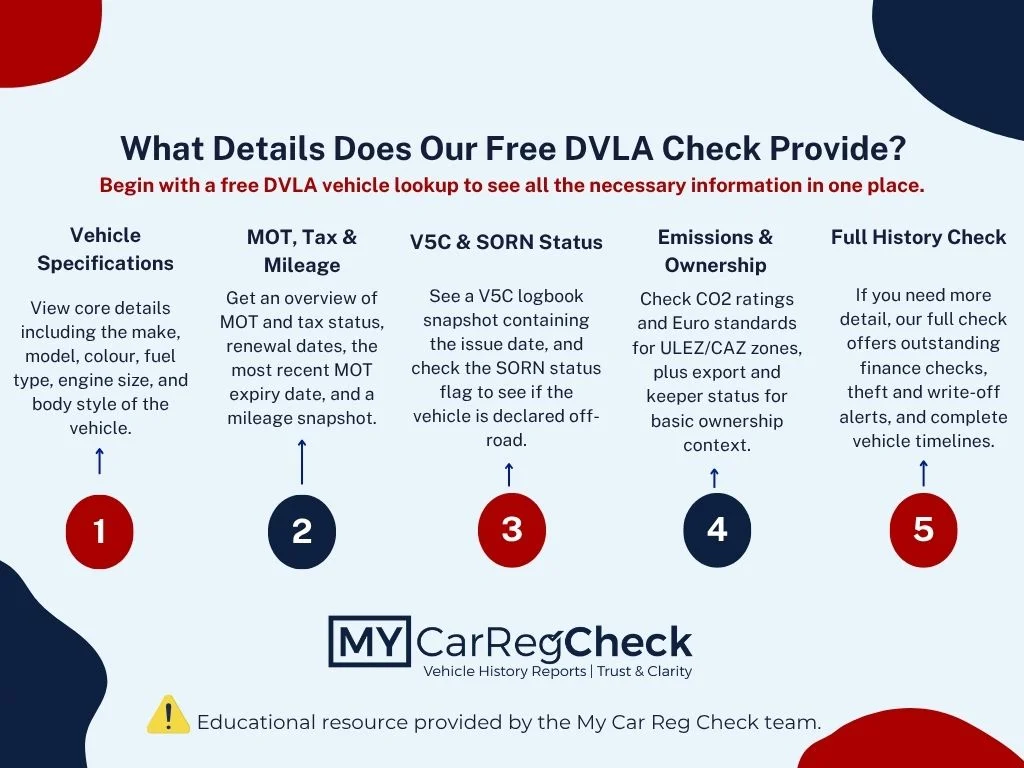
A free DVLA check gives you the key facts recorded against a vehicle’s registration, using official government data rather than guesswork or seller descriptions. That makes it a useful first check when you want to confirm the basics quickly and see whether the vehicle appears consistent on paper before you go any further.
This is the information you can expect to see:
- Make – the manufacturer recorded against the vehicle
- Model – the model linked to that registration
- Colour – the colour shown in the official record
- Engine size – useful for identifying the vehicle and understanding running costs
- MOT expiry – so you can see whether the current MOT is still valid
- Tax status – whether the car currently has valid vehicle tax
- CO2 emissions – helpful for understanding emissions-related charges and tax bands
- SORN status – whether the vehicle has been declared off the road
- V5C issue date – the date the latest logbook was issued
Small details can sometimes be the first sign that something needs a second look. If the colour does not match the car being sold, the tax is not current, or the V5C issue date is more recent than expected, it is usually worth pausing and asking why before you commit.
How Do I Run a DVLA Check on a Vehicle?
Running a DVLA check is straightforward. For the basic lookup, all you need is the vehicle’s number plate, and the result is free to view straight away.
- Enter the registration number in the search box at the top of the page.
- Submit the search to see the official DVLA details linked to that vehicle.
- Review the key information, including MOT status, tax status, and the main vehicle details recorded against the registration.
That first lookup is often enough when you simply want to confirm the basics before a viewing, a test drive, or a sale. It gives you a quick way to check whether the vehicle appears consistent on record before you spend more time on it.
If the basic result raises questions, that is usually the point where a full history check becomes useful. For example, if you want registered keeper history, finance records, or write-off markers, you can move on to a paid check for more detail.
What About Newly Registered Vehicles?
If a vehicle has only just been registered, re-registered, imported, or given a private plate, its record may not show straight away. Updates to vehicle registration details can take a few weeks to appear in the Driver and Vehicle Licensing Agency (DVLA) records, so if nothing shows yet, it does not always mean there is a problem.
How Can I Check Who Owns a Vehicle?
In most cases, you cannot use an online vehicle check to see the name and address of the registered keeper. That information is protected by privacy law, so a normal search will not show who owns the car.
If you have valid reasons, such as tracing a driver after an accident or a vehicle issue concerning your property, you will need to contact the DVLA directly and apply using a V888 form. The DVLA will only consider releasing keeper details where there is reasonable cause, so it is not something that is available through a standard lookup.
That is why it helps to separate two different questions. A vehicle check can help you confirm official car details and road-use status, but it cannot tell you the private identity of the current keeper unless the DVLA agrees that your request is justified.
DVLA Check vs a Full Car History Report
A DVLA check is a useful place to start, but it does not tell you everything. It helps you confirm the key official details linked to the registration before you go any further.
That makes it a sensible first check, especially if you want to sense-check a car before arranging a viewing. But if you are seriously considering buying it, a basic DVLA lookup will not show every issue that could affect the car’s value or raise wider concerns.
DVLA check
A DVLA check helps you confirm the official basics first, such as the MOT status, tax status, make, model, fuel type, engine size, colour, V5C issue date, and whether the vehicle is currently marked as SORN.
Full car history report
A full car history report goes further by looking for hidden problems that do not appear in DVLA data alone. That includes things like finance risk, stolen markers, insurance write-off history, mileage records, the number of previous keepers, and deeper identity checks such as a VIN check.
So, if your goal is simply to confirm the basics, a DVLA lookup is a sensible first step. If you also want a broader picture of the vehicle’s history and any potential risks, a full vehicle history check can help you make a more informed decision.
Frequently Asked Questions
What does SORN mean on a DVLA vehicle record?
SORN means the vehicle has been officially declared off the road. It should not be driven or parked on a public road, apart from limited exceptions such as travelling to or from a pre-booked MOT or testing appointment.
How do I check my driving licence online?
You can do this through the official Gov.uk driving record service. It lets you see what you are allowed to drive and whether there are any points or disqualifications on your licence.
Can I check if a car is stolen or recorded as written off in the UK?
Yes, but not through a basic DVLA check alone. You would need a full car history check to look for stolen markers and insurance write-off records.
What do Cat S and Cat N mean on a UK vehicle history report?
Cat S means the car has had structural damage but can be repaired. Cat N means the damage was non-structural, although repairs may still be important.
Can I find a car owner’s address using My Car Reg Check (MRC) or a DVLA check?
No, a normal vehicle check will not show a keeper’s private address. If you have a valid reason, you would need to apply to the DVLA directly and show reasonable cause.
Can a DVLA check tell me who currently owns a vehicle?
No. A standard DVLA check will not show the name or address of the current keeper, and that information is only available from the DVLA in limited cases where there is a valid reason.